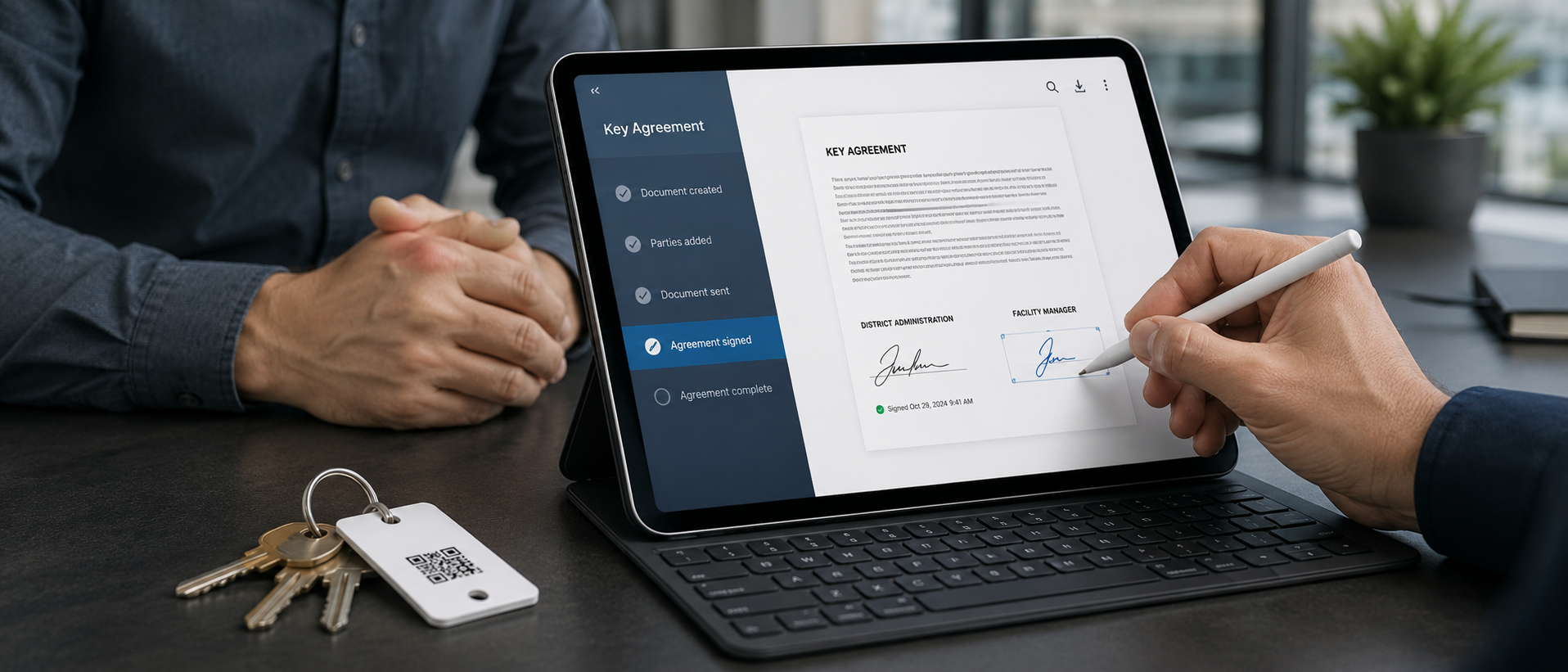

A key agreement is a small piece of paperwork that sits between everyday operations and a contested incident. On the operations side, it is a nuisance — one more thing for the admin to print, get signed, scan, and file. On the contested side, it is the document that determines whether the institution has any standing to recover costs, enforce policy, or document due diligence.
When a key goes missing and the holder claims they returned it, the question becomes "what did they agree to when they took it." If the answer is "they signed this," the conversation is short. If the answer is "we have no record," the conversation is long and almost always ends with the institution absorbing the cost.
KeyDog generates key agreements automatically at the moment of issuance. There is no separate workflow, no paper to chase, no scan to file. I want to walk through what is in the default agreement, why each element is there, and how customers customise it for their specific environment.
What is in the default agreement
The default KeyDog key agreement is a one-page PDF. Top to bottom:
- Institution identifier. Name, address, and logo. Populated from the instance settings, not re-typed per issuance.
- Holder identifier. Full legal name, employee or contractor ID, department, and the email of record. Populated from the staff record.
- Key identifier. Stamp number, key type (master, sub-master, classroom, equipment, etc.), associated doors or zones, and the date the key was cut.
- Issuance details. Date and time of issuance, expected return date, and the name of the issuing admin.
- Acknowledgement clauses. A short list of what the holder is agreeing to.
- Signature block. Holder signature, holder printed name, date.
- Issuance officer signature. Name and signature of the admin who issued the key.
The thing that makes this document useful in a dispute is the acknowledgement clauses. The defaults are based on reviews of what institutional counsel actually want to see, and they cover:
- Authority to hold. The holder confirms they are authorised by their institution to hold the key. This closes off the "I never should have been given this" defense.
- Custody responsibility. The holder accepts personal responsibility for the key from the moment of issuance until the documented return. This establishes the standard for any later disputed return.
- Non-transfer. The holder agrees not to give the key to another person, even temporarily. Most lost-key incidents we have investigated involve an undocumented transfer somewhere in the chain.
- Loss notification. The holder agrees to notify the institution within 24 hours of becoming aware of a loss. This establishes a timeline standard that the institution can enforce.
- Cost recovery. The holder acknowledges that loss may result in cost recovery for rekeying. The specific amounts are configurable per institution — some use a flat schedule, some use a "actual cost" clause.
These are defaults. Every institution has its own policies, and the defaults are starting points, not final products.
Why the auto-generation matters
The technical work to auto-populate these documents is not exotic. There is a template engine, there is a render pipeline, there is a signature capture flow. None of it is novel. What is novel — or at least under-served in this market — is the integration with the rest of the system.
When an admin clicks "Issue Key" in KeyDog, four things happen in sequence:
- The system writes an issuance event to the audit log, including the key, the holder, the timestamp, and the issuing admin.
- The template engine generates the PDF agreement, populating from the issuance event and the related records.
- The PDF is presented to the holder for signature. Holders can sign on-screen with a stylus or a finger, or — for institutions that prefer paper — the PDF can be printed, signed, and scanned back into the record.
- The signed PDF is stored against the issuance event in the audit log. It cannot be detached or replaced; it is part of the immutable record of the issuance.
The reason this matters is that any future dispute about the issuance can be answered with a single record. "When was this issued, to whom, by whom, with what agreement" is one click in the audit log. The PDF is right there. The holder's signature is right there. The issuing admin's signature is right there. The agreement language they agreed to is right there.
Compare this with the alternative — a paper agreement filed in a binder, possibly mis-filed, possibly damaged, possibly never scanned. The institution that has to find the binder in a hurry during an HR investigation or an insurance dispute is at a meaningful disadvantage versus the institution that pulls up the PDF in three seconds.
Customising for your environment
Most institutions need to customise the default template. The most common customisations:
Union language. Several of our higher-ed and K-12 customers operate under collective bargaining agreements that specify particular language about cost recovery, dispute procedures, and grievance rights. The template engine supports inserting custom clauses based on the holder's employment type, so the agreement signed by a union employee can include different language from the agreement signed by an at-will administrator.
Per-key-type clauses. A master key agreement should typically have stronger language than a classroom key agreement. The default template supports conditional clauses keyed on the key_type field, so masters automatically include the heightened-responsibility language without admins needing to remember to use a different template.
Multi-language. International schools and some healthcare environments need agreements in multiple languages. The template engine supports a per-holder language preference and will render the agreement in the appropriate language at issuance time. The available languages are English, Spanish, French, Mandarin, and Korean as of this writing. More are coming based on customer demand.
Institutional letterhead. Most institutions want their own letterhead — full logo, address block, possibly a watermark — on the agreement. The template editor supports uploading custom letterhead assets and previewing them against sample data before deploying.
Custom acknowledgement clauses. A few of our customers have specific clauses required by their legal counsel — for example, jurisdiction selection, waiver of certain claims, or insurance acknowledgements. Custom clauses can be added and labelled, with the option to make them appear conditionally based on staff record attributes.
The customisation is done through a template editor in the admin UI. It does not require engineering work or a custom integration. Most customers complete their template customisation in the first week of onboarding, work through any institutional review cycles in the next two weeks, and then largely stop thinking about it.
The piece that surprised customers
The most-requested adjustment after the first few months of using KeyDog has not been about the agreement itself. It has been about the return acknowledgement.
The original design did not generate a return acknowledgement at all. When a key was returned, the audit log captured the event and that was it. Several customers asked for a parallel PDF on return — a one-page document confirming the key was returned in a documented condition, signed by both the holder and the receiving admin. This protects the holder from a later claim that the key was never returned, and protects the institution from a later claim that the key was returned in a different condition than what was documented.
We added return agreements in the 2.2 release and they are now part of the default workflow. Most institutions enable them. A few — particularly those with very high transaction volumes — keep them disabled by default and only generate them on request, which is also supported.
Where this matters most
The institutions that get the most value out of automated key agreements are the ones in regulated environments — healthcare, government, education with research operations — and the ones with high staff turnover or contractor activity. In both cases, the agreements are not nice-to-have. They are the documented basis for any later cost recovery or compliance defense.
The institutions that benefit least are very small operations with stable, long-tenured staff. If you have eight keys and four people and nobody has left in fifteen years, the agreement is overhead without much defensive value. We still issue them by default because the cost of issuing them is essentially zero, but we understand if a customer of that profile turns them off.
If you want to see what the default agreement and the editor look like, the live demo has both, set up for the synthetic Riverside Community College. If you have specific institutional language you need to talk through, our team can help.
See KeyDog for yourself
Replace the key spreadsheet. Spin up a live demo or talk to our team about your campus.